Whova - Event & Conference App
- 4.9
- Rating
- 1.00M
- Installs
- Free
- Price
 Analysis by App-foxy
When I first opened Whova, I understood the appeal almost immediately: it is built around the messy period before, during, and after a professional event, when schedules change, useful contacts are easy to lose, and important information is scattered across emails, websites, social posts, and printed notices. As a business app from Whova, it tries to turn that temporary chaos into one place that people can actually use on a phone.
That temporary nature is also the key to judging it fairly. This is not the sort of app I would expect to open every morning for the rest of the year. Its value depends on whether I am attending an event, helping organize one, or returning to a community that uses it repeatedly. In my experience, the first week can feel impressively practical, while the longer-term question is whether the next event is important enough to justify installing and checking it again.
The app is free, carries a Teen content rating, and has reached over one million installs. Its average rating is 4.9 from around thirty thousand ratings, with roughly four thousand reviews, so it clearly has a strong reception among the people who need this particular kind of tool. I would still treat those figures as evidence of usefulness in event situations rather than proof that it belongs on every phone permanently.
You May Also Like

 Blood Strike: 2.5 Anniversary
Blood Strike’s Loadouts Turn Every Drop Into a Tactical Gamble
A close look at Blood Strike’s custom loadouts: how fast access to signature weapons reshapes its battle royale rhythm, rewards preparation, and narrows the gap between fights.

 Pandora - Music & Podcasts
Pandora’s Music Is Easy to Start, but Harder to Recover
Pandora’s strength is its low-effort path from a seed to a station. Its weak spot is how much confidence it asks you to place in connection, setup, and quiet recovery.

 8 Ball Pool
 Is Built on Rivalries, Rematches, and Routine
A close look at the rivalries, rematches, shared routines, and unanswered safety questions that turn a quick pool match into a persistent mobile community.

 Samsung Music
’s Quiet Strength Is Playing What You Already Own
Its reach comes less from spectacle than from dependable access to a personal library. That simplicity is both the app’s strongest retention engine and its ceiling.

 AccuWeather: Weather Radar
AccuWeather Review: A Quick, Clear Forecast for Everyday Decisions
For everyday plans, the best forecast is the one you can understand quickly. AccuWeather makes rain timing, radar, and local conditions easy to act on, with a few trade-offs.

 Hill Climb Racing
Why Hill Climb Racing Still Turns Crashes Into One More Run
A tiny car, a bumpy hill and one more upgrade: Hill Climb Racing keeps resurfacing because its simple chaos makes every near-miss feel personal.
More From Our News Desk



What Whova feels like during the first event
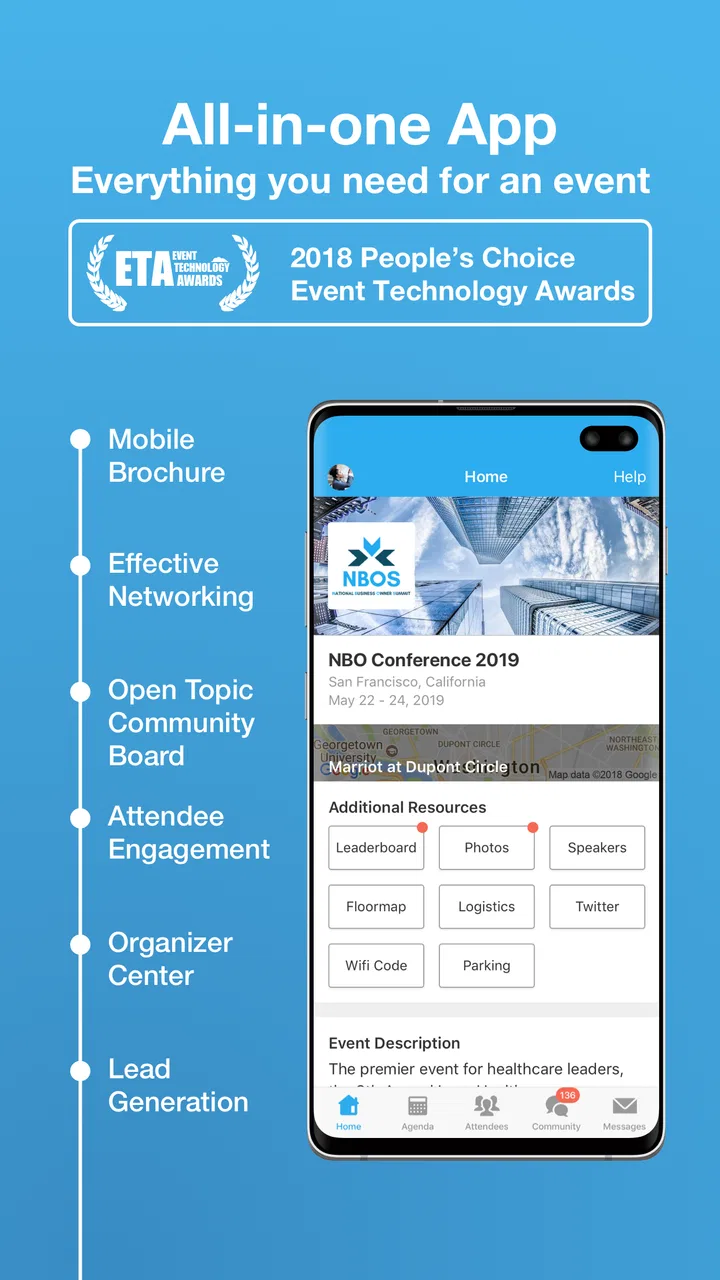
The strongest first impression comes from having event information gathered in a single mobile experience. Instead of switching between a PDF schedule, a registration email, a browser page, and a messaging service, I can use the event app as the main reference point. That matters most when I am moving between rooms or trying to decide what to attend next with only a few minutes available.
A realistic example is a two-day business conference. On the first morning, I might need to confirm the opening session, locate a room, check which talks happen later, and remember the name of someone I met during registration. A conventional event website may contain all of those details, but it often makes me hunt through menus. Whova makes more sense when I need the information in short bursts rather than when I want to read a complete event guide from beginning to end.
I also like the way an event-focused app changes the purpose of my phone. The phone stops being merely a ticket holder and becomes a working companion for the day. I can use it while standing in a queue, between sessions, or while deciding whether a networking opportunity is worth leaving a talk for. That immediacy is more useful than it sounds, especially at large events where printed schedules become outdated as soon as something moves.
There is a practical trade-off here. Whova is only as useful as the event experience built around it. If organizers provide incomplete information, fail to keep the schedule current, or do not encourage attendees to use the app, the installation can feel like another obligation. The software cannot compensate for an event that has poor communication. I would therefore judge the app partly by how well the particular conference has adopted it, not only by the interface on my phone.
Useful beyond simply reading a schedule
The more interesting value appears when I stop treating Whova as a digital timetable. It can act as a personal event workspace: a place to orient myself, decide where to spend limited time, and keep the event’s professional context close at hand. That is a more useful mental model than expecting it to replace every communication or productivity tool I already use.
One tip I found worthwhile is to review the event information before arriving rather than waiting until the first session starts. Even a quick look helps me identify the sessions that matter most and notice where the day may become crowded. I can then treat the app as a decision aid during the event instead of repeatedly browsing without a plan. This is a small habit, but it reduces the feeling that I am reacting to the schedule all day.
Another non-obvious strength is the way an event app can support selective participation. I do not have to treat every session, announcement, or networking opportunity as equally important. I can use the available information to create a lighter personal route through the event. For someone attending a conference for a specific business goal, that is more valuable than simply having every item displayed in chronological order.
Whova is also a better fit for professional gatherings than for casual social occasions. Its business orientation makes sense when attendees need context around speakers, sessions, organizations, or contacts. If I only want a simple calendar invitation and a venue address, it may be more software than I need. The app earns its place when an event has enough moving parts to make a dedicated companion worthwhile.
Who gets the most from the first week
I would recommend trying it first to people attending conferences, trade events, workshops, or other organized professional gatherings where the schedule and community are central to the experience. It is especially suitable for someone who dislikes carrying printed material or keeping several browser tabs open while moving through an event.
Organizers and frequent attendees are another audience. An organizer can view the app as part of the event’s communication layer, while an attendee can use it as a personal guide. Those are different needs, and the experience may feel more rewarding for people whose events genuinely use the platform rather than merely mentioning it during registration.
I would be more cautious for someone who rarely attends events, prefers paper schedules, or already receives all necessary information through a simple company system. The free price removes the financial barrier, but not the time cost of installing, learning, and checking another app. Free does not automatically mean frictionless.
Does it still matter after the novelty fades?
The month-to-month value of Whova is unusual because it is not based on daily repetition. Many apps become useful through a routine: I open them to manage tasks, check messages, or track something personal. This app is more seasonal and event-driven. Its recurring value comes from returning to it whenever another relevant gathering appears, not from forcing it into my everyday routine between events.
That can actually be a strength. I do not need Whova to become another attention-hungry feed. I need it to be dependable when an event begins. A good event companion should help me focus on the event itself, not persuade me to spend the whole month inside the app. In that sense, its limited role is appropriate.
The challenge is remembering the app when the next invitation arrives. If I installed it for one conference and then ignored it, I may not immediately remember what it can do. The product has lasting value only when the events I attend continue to use it or when I personally recognize that a dedicated event workspace saves me enough effort. That makes adoption dependent on a network effect: the more relevant events around me use it, the easier it is to keep it in my toolkit.
Its current version is 11.9.1, which suggests an actively maintained product rather than a forgotten one. I see that as important for an app tied to live schedules and changing event information. Still, maintenance is not only about publishing updates. The real test is whether each event feels current, organized, and easy to navigate when I need it.
The difference between recurring value and repeated installation
There is a useful distinction between keeping the app installed and finding it valuable again. I do not need to open Whova every week for it to earn a permanent place on my phone. If I attend several professional events over a year and each one becomes easier to follow because of it, that is enough recurring value for me.
On the other hand, if every event requires me to relearn the layout, search for basic details, or work around inconsistent information, the app becomes disposable. I might still use it when required, but I would not recommend it as a lasting tool. The product needs to make the second and third event feel familiar, not like starting from zero each time.
My practical advice is to keep it installed only if I expect to attend more events that use it. Otherwise, I would remove it after the event and reinstall it when needed. That is not a criticism of the app; it is a realistic response to its event-based purpose. A tool can be excellent without being a daily habit.
Maintenance, attention, and small points of friction
The maintenance burden is moderate rather than heavy. I do not have to manage a full project system or build a complicated database, but I do need to pay attention to the event’s information flow. If a schedule changes, the app becomes useful precisely because I am willing to check it. If I never open it after installation, I lose much of its advantage.
For attendees, the main task is deciding how deeply to use it. I can keep things simple and use it as a reference, or I can spend more time exploring the event community and planning my participation. The second approach may produce more value, but it also increases the amount of time I spend looking at my screen during an event. That is an important trade-off for anyone who wants to network face to face.
For organizers, the burden is more serious in principle, even though the attendee may not see all of it. A platform like this only feels polished when the event information is prepared carefully and kept coherent. If the schedule, location details, or announcements are handled casually, attendees may blame the app for confusion that actually comes from event management. I would not choose Whova as a shortcut around planning; I would choose it as a way to present good planning more effectively.
The app can also create a subtle expectation that every useful interaction should happen digitally. That is convenient for reminders and coordination, but it can make a professional gathering feel more screen-centered. I prefer using it in short checks: before a session, during a schedule change, or when I need to recall event context. Leaving it open constantly would defeat the purpose of attending in person.
Where fatigue begins
The first source of fatigue is notification pressure. Event apps are naturally tempted to surface updates, reminders, and activity, but not every alert deserves immediate attention. I would be selective about what I allow to interrupt me, especially during sessions or meetings. The app is more helpful when it supports my priorities instead of competing with them.
The second is information density. A large event can generate a lot of material, and putting everything in one place does not automatically make it easy to process. I may still need to make my own shortlist of sessions, people, and goals. Whova can reduce searching, but it cannot decide what matters to my career or business.
The third is the temporary-account feeling that comes with event-specific use. I may invest time in setting up my profile or reviewing an event, only to have that context become irrelevant when the gathering ends. That is normal for this category, but users expecting a permanent professional network may find the experience less satisfying than a dedicated networking service or a general business platform.
Compared with a basic calendar, Whova offers a richer event context, but a calendar is often faster for a single appointment. Compared with email, it can be easier to scan event information in one place, but email remains better for formal records and communication that must be searchable long after the event. Compared with a general social network, it is more focused and less distracting during the event, but it does not replace the broader reach or long-term identity of those services.
That comparison helps clarify the right role. I would not use Whova to manage my entire professional life. I would use it as a temporary layer around a specific event, then return to my normal calendar, notes, email, and contacts afterward. Its strength is concentration, not universality.
My long-term verdict for attendees and organizers
After the first-week appeal fades, I think Whova earns lasting space for the right kind of user. It is a practical companion for people who attend recurring conferences or belong to professional communities that use it consistently. The app’s free access makes experimentation easy, and its strong average rating reflects that many users find the event-focused approach worthwhile.
My recommendation comes with a condition: use it deliberately. Before an event, set a clear purpose for the app. During the event, use it to make decisions, follow changes, and preserve useful context rather than browsing without direction. Afterward, move important contacts and notes into the tools you already trust. That workflow prevents the app from becoming a temporary information silo.
I would skip it when the event is small enough for a simple email, calendar entry, or printed agenda. I would also hesitate if I am looking for a permanent professional community, a full task manager, or a general-purpose networking platform. Those needs belong elsewhere. Whova is most convincing when the event itself is complex enough to justify a dedicated mobile companion.
For organizers, the decision is more strategic. The app can make an event feel more coordinated, but only when the underlying content is maintained with care. A polished event inside Whova is helpful; an incomplete event inside a polished interface is still frustrating. The platform should support communication, not become an excuse to add another layer without assigning someone responsibility for it.
Whova was released on October 7, 2013, and the continued version development fits its role as a mature event tool rather than a novelty. I would not describe it as an app I use constantly, but that is not the standard I would apply here. Its lasting value is measured by whether it makes each relevant event calmer, easier to navigate, and more purposeful.
My final view is positive, with realistic boundaries. Whova is worth keeping in my toolkit when professional events are a recurring part of my life, especially when those events actively rely on it. It does not replace my calendar, inbox, notes, or long-term networking tools, and it should not try to. Used as a focused companion instead of a permanent social destination, it delivers enough practical value to justify returning to it whenever the next worthwhile event comes around.
FAQs for Whova - Event & Conference App
01What is Whova, and how does it enhance my event experience?
Whova is a comprehensive event and conference app designed to enhance your event experience by offering features like agenda management, networking opportunities, and real-time updates. It allows you to create a personalized schedule, connect with other attendees, and access event materials, all in one convenient platform.
02Is Whova user-friendly for first-time users?
Absolutely! Whova is designed with user-friendliness in mind, featuring an intuitive interface that makes navigation simple for first-time users. The app offers a seamless experience, with easy access to event schedules, speaker information, and networking tools, ensuring you can focus on enjoying the event without technical hassles.
03Can I network with other attendees using Whova?
Yes, Whova offers robust networking features that allow you to connect with other attendees before, during, and after the event. You can use the app to send messages, set up meetings, participate in discussion forums, and even join virtual meetups, making it a valuable tool for expanding your professional network.
04Does Whova support virtual and hybrid events?
Whova is highly adaptable and supports both virtual and hybrid events. It integrates live streaming, virtual exhibitor booths, and interactive sessions, providing a comprehensive solution for attendees and organizers. This flexibility ensures that you can fully engage with the event content regardless of your location.
05Is Whova secure, and how does it protect my data?
Yes, Whova prioritizes user security and data protection. The app uses encryption and follows industry-standard practices to ensure your personal information and event interactions remain secure. Additionally, Whova complies with data privacy regulations, offering users peace of mind regarding their data security.
Pros
- User-friendly interface for easy navigation.
- Real-time updates on event changes.
- Networking tools to connect with attendees.
- Customizable agenda planner.
- Interactive maps for event locations.
Cons
- Limited offline functionality.
- Occasional notification delays.
- Some features require premium access.
- High battery consumption during use.
- Limited integration with other calendars.

Whova - Event & Conference App
Gallery